Turn your WhatsApp into a professional support desk
Support customers, distribute conversations across your team, and track everything from a single panel.
- One or several company WhatsApp numbers
- Several agents working together
- All support centralized
- Team management dashboard
Already a customer? → Log in
One or several WhatsApps. Your whole team.
Connect your company's number — or as many as you use — and let several agents work at the same time, each with their own conversations and queues.
Sales, support, finance: each department can have its own number, and they all show up in the same panel. Whenever you want, just filter conversations by number.
See how it works in practice →DeskBot in action
Get a complete view of your support in a single place.
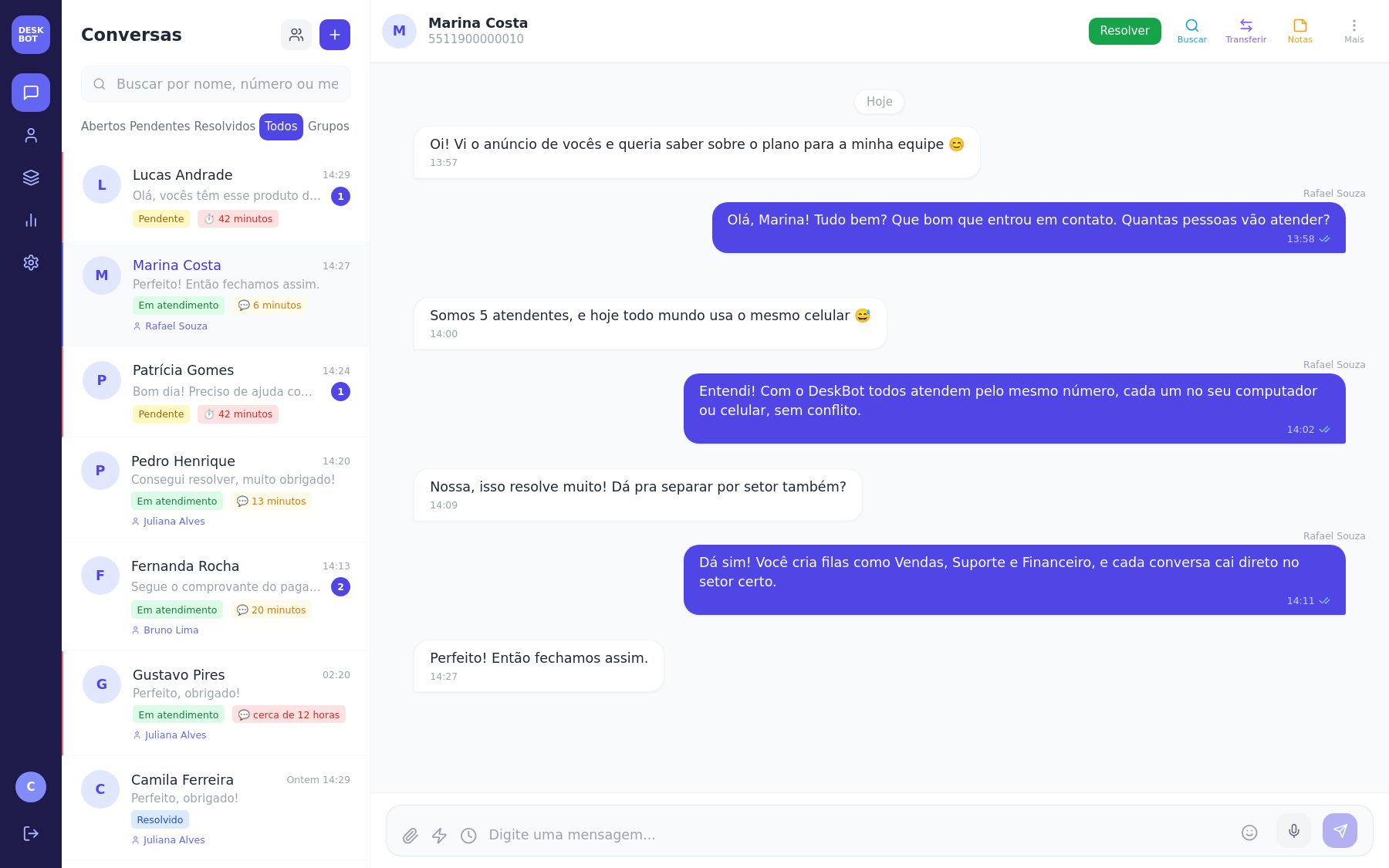
Main support screen. See who's waiting, who's already been picked up, and reply to everyone from the panel, with the same chat look your team already knows.
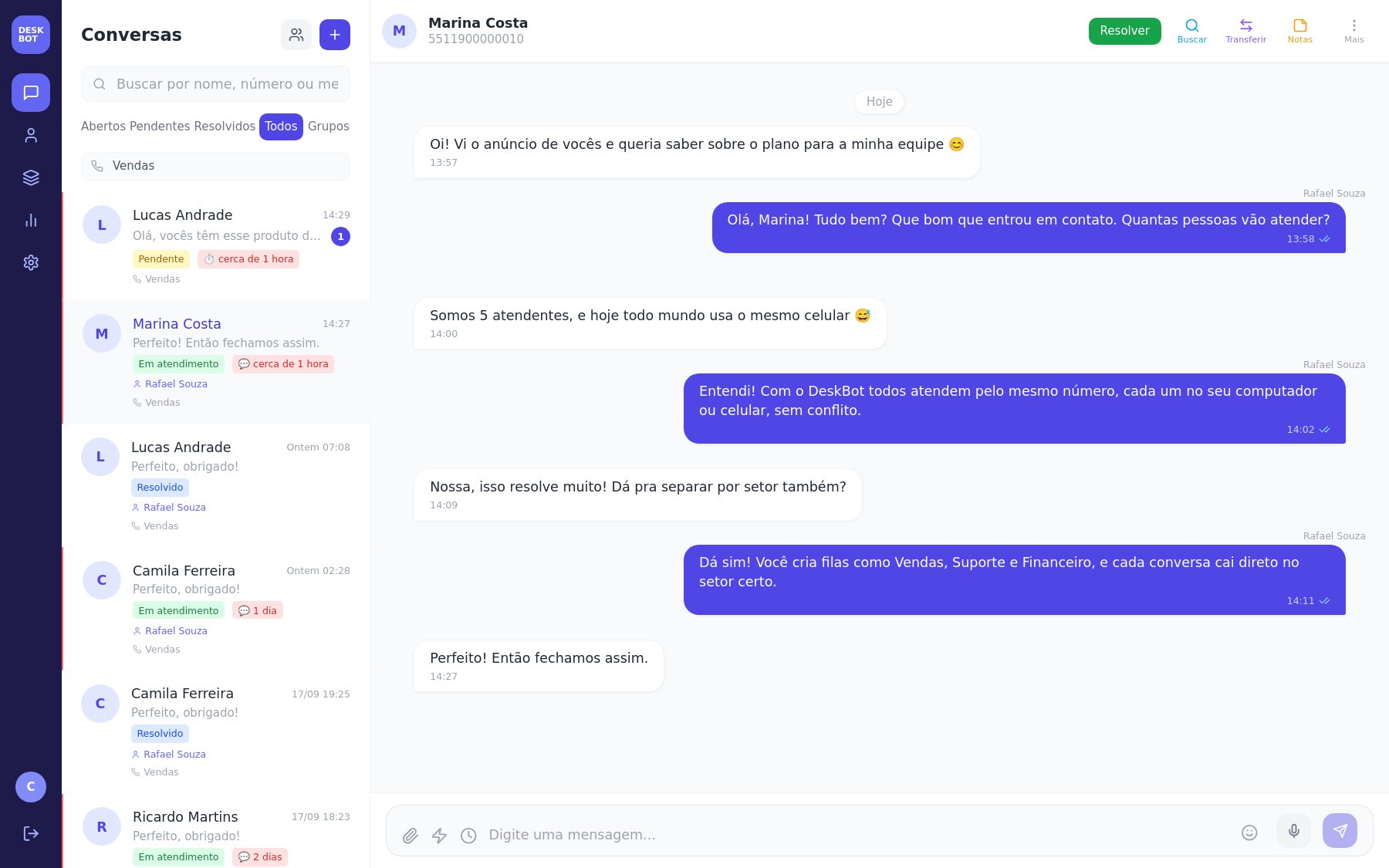
Multiple WhatsApp numbers. Connect more than one company number and handle everything in the same panel — filter conversations by number and see which one each customer reached out through.
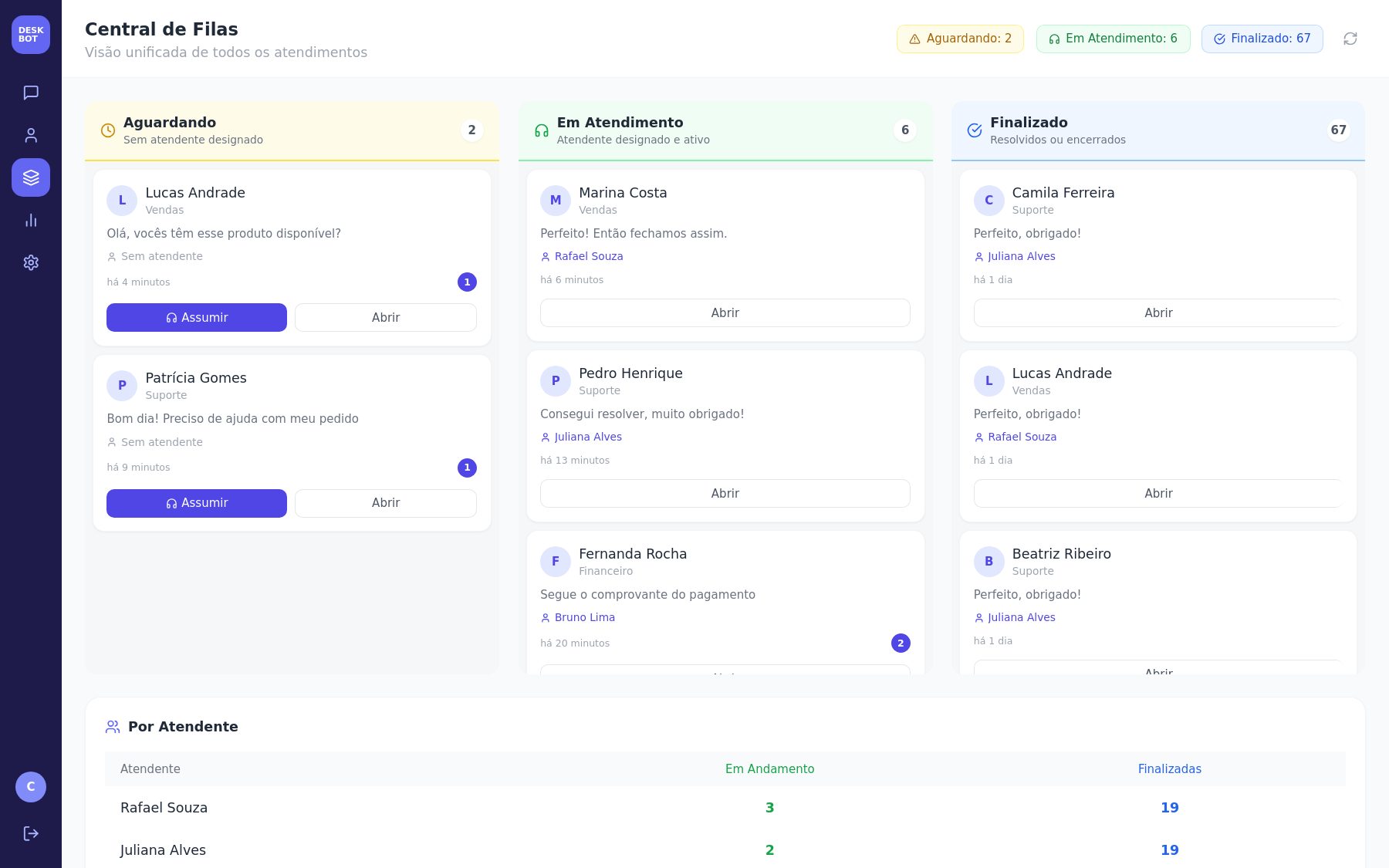
Queue Center. One single view of everything that's waiting, in progress and done — with a one-click pick-up button and a per-agent summary.
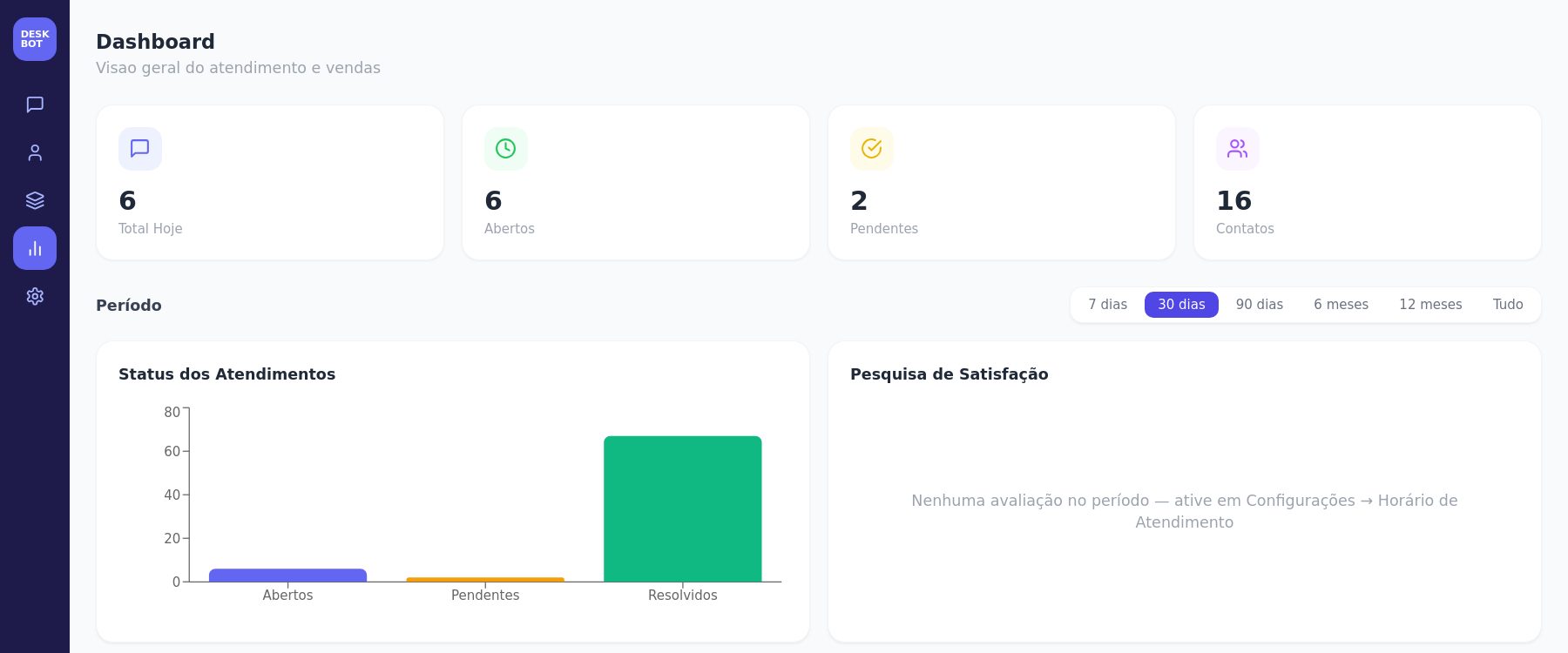
Dashboard. Support indicators and a status chart, with a period filter to track your team's progress.
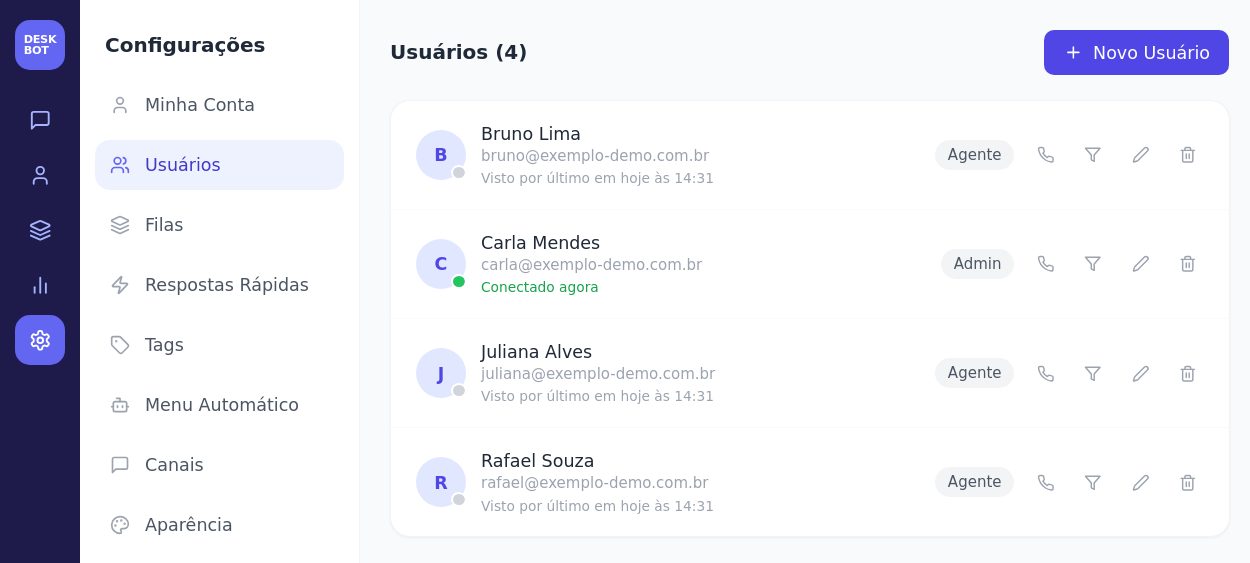
Agent management. Register your team, set each person's role, and see who's online right now.
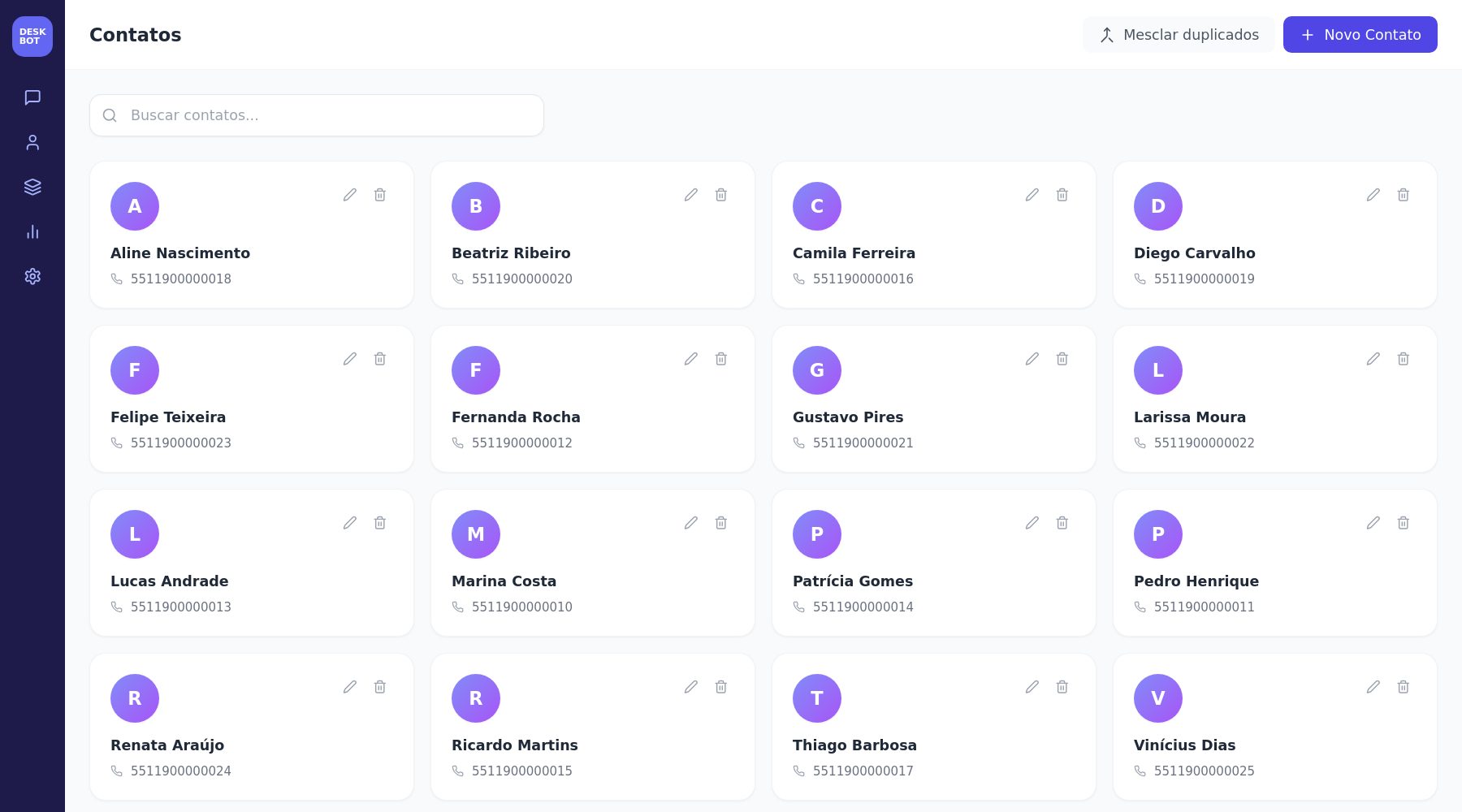
Customers. Every company contact in one place, with quick search and each conversation's history.
Real screens from the system, shown with sample data.
Everything your team needs to give better support
From the first contact to a satisfied customer, every step organized in one place.
Team support
Several agents working at the same time on the company's WhatsApp, with no conflicts or duplicate replies.
Multiple WhatsApp numbers
Connect more than one company number in the same panel, filter conversations by number and set who handles each one.
Support queues
Organize conversations by department and team — Sales, Support, Finance and as many departments as you need.
Menu automation
A bot with an automatic menu lets the customer choose the department themselves. Hours and texts are configured by you.
Real-time support
Receive and reply to messages from the panel, with alerts as soon as a new conversation arrives and read receipts, just like WhatsApp.
Conversation history
Look up past conversations, with text search, and get context on every customer.
Customer organization
Centralize customer information and history, with profile photo, notes and tags.
Management dashboard
Track conversations, queues and agents in a management panel, with a period filter.
Agent management
Control users, teams and permissions — including who can see each queue and each WhatsApp number.
Full media support
Receive and send images, audio, video, documents and locations — with preview and direct download.
Satisfaction survey
A 1-to-5 rating sent to the customer once the conversation is closed.
Business hours
Set days, lunch break and an automatic message outside business hours — your way.
DeskBot adapts to your business
Every company handles support differently. That's why DeskBot is customized for each customer and can connect to the cloud systems you already use.
Queues and menus your way
Departments, automatic menu, hours and messages configured to match your company's routine.
Your own rules and permissions
Who sees each queue, each WhatsApp number and each conversation, set for your team.
Features on request
Need something specific for your business? We evaluate it and build it together with you.
Guided rollout
Our team supports the initial setup and the adjustments after you start using it.
Connected to the systems you already use
We connect DeskBot to your company's cloud systems — ERP, finance, document signing, calendar and CRM — so support and the rest of your operation talk to each other. These are the most common:
ERP & management
Finance & billing
E-signature
Calendar
CRM & marketing
Automation & data
Each integration depends on the system offering API access and is evaluated individually. The names above belong to their respective owners and are mentioned only as examples, with no partnership or endorsement implied. Use a different system? Tell us.
Built for teams that support customers over WhatsApp
If your support happens on WhatsApp and more than one person is involved, DeskBot was built for you.
Small businesses
Centralize support without depending on several phones.
Technical service shops
Organize tickets, customers and technicians in one place.
Shops & retail
Separate sales, support and after-sales.
Service providers
Never miss a quote request or customer message.
Clinics & offices
Separate questions, appointments and follow-ups by department, each team in its own flow.
Companies with support teams
Centralize communication and stay in control of every conversation.
Your support, under your control
What the system actually does to keep your company's support organized and protected.
Cloud-based system
Access it from anywhere with internet, no server to install and no dependency on a specific computer.
Secure connection
Access to the panel uses an encrypted connection (HTTPS). Passwords are stored hashed, never in plain text, and there's a login attempt limit.
Access control
Administrator and agent roles, with visibility set by queue and by WhatsApp number.
Conversation history
Conversations are logged and available for lookup, with text search.
Activity log
Sensitive actions, like deleting a conversation or the DeskBot team accessing your account for support, are recorded in an audit log.
Daily backup
The system's database has an automatic backup every day.
Your customers' conversations, protected
Customer support involves personal data. Here's a clear look at how DeskBot handles your company's and your customers' information.
The data is your company's
Conversations, contacts and settings belong to the contracting company.
Isolation between companies
Each company only accesses its own account's data — never another company's.
Access only for those who need it
Permissions by role, by queue and by WhatsApp number define who sees each conversation.
No data selling
We don't sell, rent or share conversations or contacts with third parties for advertising.
Deletion on your command
Administrators can delete conversations and contacts from the system, and you can request the deletion of account data.
Transparent retention
Text history is kept while the account is active; media files older than 90 days are automatically removed.
LGPD: who's responsible for what
DeskBot is a Brazilian company and, as such, is subject to the LGPD (Brazil's data protection law, similar to Europe's GDPR). The law splits responsibilities. Here's how it works in DeskBot:
DeskBot provides features to support LGPD compliance, but compliance also depends on how your company uses the system and handles your customers' data. Data is hosted on cloud servers in the United States, as detailed in the Privacy Policy (available in Portuguese).
Take support anywhere
DeskBot also works as an app — on Android, direct install without going through the store; on iPhone, add it to your home screen right from Safari; on Windows and Mac, download and install it like a regular program. Same conversations, same team, on any device.
Get started in 4 steps
One or several WhatsApp numbers can be used by the whole team through the panel.
Log in
Sign in with your email and password on the DeskBot panel
Connect your numbers
Scan the QR code for each company WhatsApp number
Set up your queues
Create departments and add your agents
Start supporting customers
Messages arrive in real time for the whole team
See DeskBot in action
From the customer's first “hi” to the saved history, this is the path every conversation takes.
- Customer sends a message on WhatsApp
- The message shows up in DeskBot
- An agent picks up the conversation
- The conversation is routed to a queue
- Another agent can pick it up, if needed
- The conversation is closed
- The history stays available
A plan sized for your team
Every company handles support differently. Tell us about yours and we'll put together a tailored proposal based on your team's size.
Frequently asked questions
Still have a question? Message us on WhatsApp and we'll reply quickly.
Does DeskBot work with WhatsApp?
Yes. You connect your company's number (or more than one) by scanning a QR code — just like WhatsApp Web — and start supporting customers from the DeskBot panel.
Can I have several agents?
Yes. Each agent has their own login, and the system tracks who picked up each conversation, avoiding duplicate replies.
Can the whole team use the same number?
Yes, that's one of DeskBot's main goals: a single company WhatsApp number handled by the whole team, each person with their own conversations and queues.
Can I connect more than one WhatsApp number?
Yes. You can connect more than one company number (for example, one for sales, another for support and another for finance) and handle all of them in the same panel. You can filter conversations by number, set an agent responsible for each number, and even limit which numbers each agent can see.
Is support logged anywhere?
Yes. Every conversation is saved in the history, with text search, so you can look it up whenever you need to.
Do I need to install anything?
No. DeskBot runs directly in the browser. If you'd rather, there's also an app for Android, Windows and Mac, and on iPhone you can add a shortcut to your home screen.
Does DeskBot run in the cloud?
Yes. The system runs on a cloud server and can be accessed from anywhere with internet.
Can I split support by department?
Yes. You create queues (like Sales, Support and Finance), with sub-queues if needed, and an automatic menu can route the customer to the right department.
Are my data and my customers' conversations safe?
Access to the panel uses an encrypted connection (HTTPS), passwords are stored hashed, each company only sees its own account's data, and permissions by role, queue and WhatsApp number define who sees each conversation. Sensitive actions, like deleting conversations or the DeskBot team accessing your account for support, are kept in an audit log, and the database has an automatic daily backup.
Is DeskBot LGPD compliant?
DeskBot provides features to support your company's LGPD compliance (Brazil's data protection law): isolation between companies, access control, data deletion, and a channel for data subject requests. Under the law, your company is the controller of its customers' data and DeskBot acts as the processor. Details are in our Privacy Policy (available in Portuguese).
Does DeskBot share or sell my data?
No. We don't sell, rent or share conversations or contacts with third parties for advertising. Data handling is limited to what's needed to run the service: hosting, the channels you connect (like WhatsApp), and optional features that only run if enabled for your company, such as AI-based routing.
Does DeskBot integrate with other systems my company uses?
Yes, on request. We connect DeskBot to cloud systems that offer API access, such as ERP, finance, e-signature, calendar and CRM. Tiny ERP, for example, is already used by customers. Each integration is evaluated and configured for your company; tell us which systems you use.
Can I delete my customers' data?
Yes. Administrators can delete conversations and contacts directly from the system, and you can request the deletion of account, channel or contact data by emailing contato@deskbot.com.br.
How do I sign up?
Talk to our team on WhatsApp or by email at contato@deskbot.com.br. We'll learn how your support works and put together a proposal for your company.
Ready to organize your support?
Centralize your WhatsApp, organize your team, and get more control over every conversation.